
Editor
JavaScript Playground
JavaScript Compiler Online
Run JavaScript code online without local setup. This learning section covers core syntax, ES6 features, closures, promises, async/await, generators, throttling, and practical debugging patterns with example code.
Interactive Workspace
Run code instantly in your browser
Ctrl/Cmd + Enter to run. Resize editor/output panes on desktop.
Output
Program Input (stdin)
Editor
Visual Walkthrough
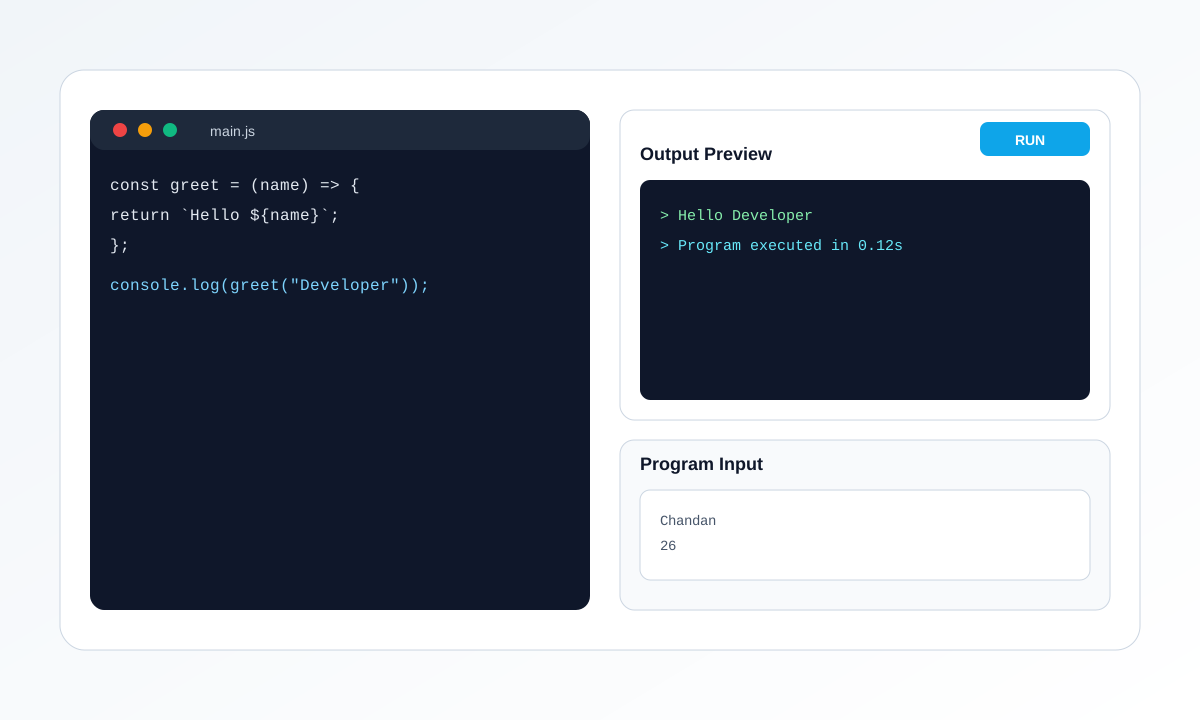
The left panel is your code editor, and the right panel shows output. Use tabs for files, add input lines when using prompt(), then click Run to refresh result instantly.
- Pick the correct mode: HTML or JavaScript.
- Edit code in active file tab and keep snippets focused.
- For JavaScript input, add one value per line in Program Input.
- Run and read output or error logs to debug quickly.
About This JavaScript Compiler
This compiler focuses on fast JavaScript execution directly in the browser. It is useful for interview preparation, concept revision, and testing utility logic before moving code into larger applications. You can practice both beginner and advanced topics on the same page and compare output in real time.
- Run JavaScript instantly in browser
- View runtime output and error messages
- Fast iteration with Ctrl/Cmd + Enter
- Download script file for reuse
How to Use
- Select JavaScript mode.
- Write code in main.js.
- Click Run or press Ctrl/Cmd + Enter.
- Check output and fix errors quickly.
Use the formatter for JSON/YAML/XML cleanup and the regex tester for parsing and validation workflows.
How to Use Input in JavaScript Compiler
Use prompt() in your JavaScript code and provide each input value on a new line in the Program Input panel. Input lines are consumed in order.
const name = prompt("Enter name:");
const age = prompt("Enter age:");
console.log("Name:", name);
console.log("Age:", age);
Input lines example:
Chandan
26
Starter Example: Score Summary
Try this starter snippet and modify it in the compiler above.
const scores = [45, 78, 91, 60];
const passed = scores.filter((s) => s >= 60);
const summary = passed.map((s) => ({
  score: s,
  grade: s >= 90 ? 'A' : 'B'
}));

console.log(summary);
Basic Topics with Examples
Start with foundations before moving to advanced implementation patterns.
var, let, and const
These three keywords define variable scope and mutability. Use const for fixed references, let for reassignment, and avoid var in modern code unless legacy behavior is required.
var oldWay = 'function-scoped';
let counter = 1;
const appName = 'Online Compiler';

counter += 1;
console.log(oldWay, counter, appName);
Key takeaway: Prefer const by default, use let for changing values, and limit var usage.
Data Types and Type Checks
Understanding string, number, boolean, object, and undefined helps you avoid TypeError issues while writing conditions and function logic.
const user = 'Asha';
const score = 92;
const active = true;
const settings = { theme: 'light' };

console.log(typeof user, typeof score, typeof active, typeof settings);
Key takeaway: Check value types before calling methods or doing complex operations.
Functions and Parameters
Functions let you reuse logic and keep scripts organized. Start with named functions and then move to arrow functions where suitable.
function greet(name) {
  return 'Hello, ' + name;
}

const multiply = (a, b) => a * b;
console.log(greet('Developer'), multiply(4, 5));
Key takeaway: Small reusable functions make code easier to test and maintain.
Conditionals and Loops
Control flow helps create dynamic behavior based on user input or data state.
for (let i = 1; i <= 5; i++) {
  if (i % 2 === 0) console.log(i, 'even');
  else console.log(i, 'odd');
}
Key takeaway: Combine conditionals and loops for practical data checks and formatting.
Arrays and Core Methods
map, filter, and reduce are core tools for transforming collections. These methods are heavily used in modern frontend development.
const prices = [199, 499, 799, 999];
const discounted = prices.map((p) => p * 0.9);
const premium = discounted.filter((p) => p > 500);
const total = premium.reduce((sum, p) => sum + p, 0);

console.log(discounted, premium, total);
Key takeaway: Use method chains for readable data processing.
Object Basics and Optional Chaining
Objects store structured data. Optional chaining helps safely access nested properties without runtime crashes.
const profile = {
  name: 'Ravi',
  address: { city: 'Pune' }
};

console.log(profile.address?.city);
console.log(profile.company?.name); // undefined safely
Key takeaway: Optional chaining prevents crashes when data is missing.
Advanced Topics with Examples
Apply production-oriented patterns for performance, structure, and maintainability.
Closures
A closure remembers variables from its outer scope even after the outer function returns. Closures are useful for private state and factory functions.
function createCounter() {
  let count = 0;
  return function () {
    count += 1;
    return count;
  };
}

const next = createCounter();
console.log(next(), next(), next());
Key takeaway: Closures are essential for encapsulation and controlled state.
Promises
Promises represent asynchronous outcomes and help avoid deeply nested callbacks. Learn resolve, reject, then, catch, and finally.
function fetchScore() {
  return new Promise((resolve) => {
    setTimeout(() => resolve(88), 500);
  });
}

fetchScore()
  .then((score) => console.log('Score:', score))
  .catch((err) => console.error(err))
  .finally(() => console.log('Done'));
Key takeaway: Promises are the foundation for modern async flows.
Async and Await
async/await provides cleaner asynchronous code on top of promises. Always wrap awaited operations in try/catch when failure is possible.
async function loadUser() {
  try {
    const response = await fetch('https://jsonplaceholder.typicode.com/users/1');
    const user = await response.json();
    console.log(user.name);
  } catch (error) {
    console.error('Request failed', error);
  }
}

loadUser();
Key takeaway: Use async/await for readable async code and explicit error handling.
ES6 Features: Destructuring, Spread, Template Literals
ES6 syntax reduces boilerplate and improves readability. These features are standard in modern JavaScript codebases.
const person = { name: 'Nina', role: 'Engineer', city: 'Jaipur' };
const { name, ...rest } = person;
const next = { ...rest, active: true };
const message = 'User ' + name + ' is active: ' + next.active;

console.log(message, next);
Key takeaway: Use modern syntax for clearer, shorter code.
Throttle Function
Throttling limits how often a function runs within a time window. It is useful for scroll and resize events.
function throttle(fn, delay = 200) {
  let last = 0;
  return (...args) => {
    const now = Date.now();
    if (now - last >= delay) {
      last = now;
      fn(...args);
    }
  };
}

const onScroll = throttle(() => console.log('scroll event'), 300);
window.addEventListener('scroll', onScroll);
Key takeaway: Throttle improves performance by reducing event flood.
Debounce Function
Debounce waits until the user stops triggering events for a period. It is ideal for search input and auto-save features.
function debounce(fn, delay = 300) {
  let timer;
  return (...args) => {
    clearTimeout(timer);
    timer = setTimeout(() => fn(...args), delay);
  };
}

const onSearch = debounce((query) => console.log('Search:', query), 300);
Key takeaway: Use debounce for delayed execution after user inactivity.
Generator Functions
Generators can pause and resume execution using yield. They are useful for custom iterators and controlled sequence generation.
function* idGenerator() {
  let id = 1;
  while (id <= 3) {
    yield id;
    id += 1;
  }
}

const gen = idGenerator();
console.log(gen.next().value, gen.next().value, gen.next().value);
Key takeaway: Generators provide fine-grained control over iteration flow.
Error Handling Strategy
Production code should fail gracefully. Wrap risky logic with try/catch and return predictable fallback values.
function parseSettings(raw) {
  try {
    return JSON.parse(raw);
  } catch (error) {
    return { error: 'Invalid JSON settings', fallback: true };
  }
}

console.log(parseSettings('{invalid}'));
Key takeaway: Defensive error handling improves reliability and debugging.
Common JavaScript Errors and Fixes
Unexpected token
Check brackets, commas, and quotes near the reported line number.
ReferenceError is not defined
Declare variables before usage and verify naming consistency.
TypeError on method calls
Confirm value types before calling map, split, toLowerCase, or similar methods.
Can I test JavaScript quickly without setup?
Yes. This page is built for instant JavaScript execution in your browser.
Does this page show JavaScript runtime errors?
Yes. Runtime issues and console messages are shown in the preview output.
Can I use this page on mobile and tablet?
Yes. The interface uses responsive layouts so it remains usable across device sizes.
Does this page cover closures, promises, async await, and ES6 topics?
Yes. This page includes practical examples for closures, promises, async/await, ES6 syntax, throttling, generators, and more.