
Editor
HTML Coding Workspace
HTML, CSS and JavaScript Compiler Online
Write markup, styles, and scripts together and preview output instantly. This page includes beginner and advanced HTML topics with practical code so learners can move from basics to real UI patterns.
Interactive Workspace
Run code instantly in your browser
Ctrl/Cmd + Enter to run. Resize editor/output panes on desktop.
Live Preview
Program Input (stdin)
Editor
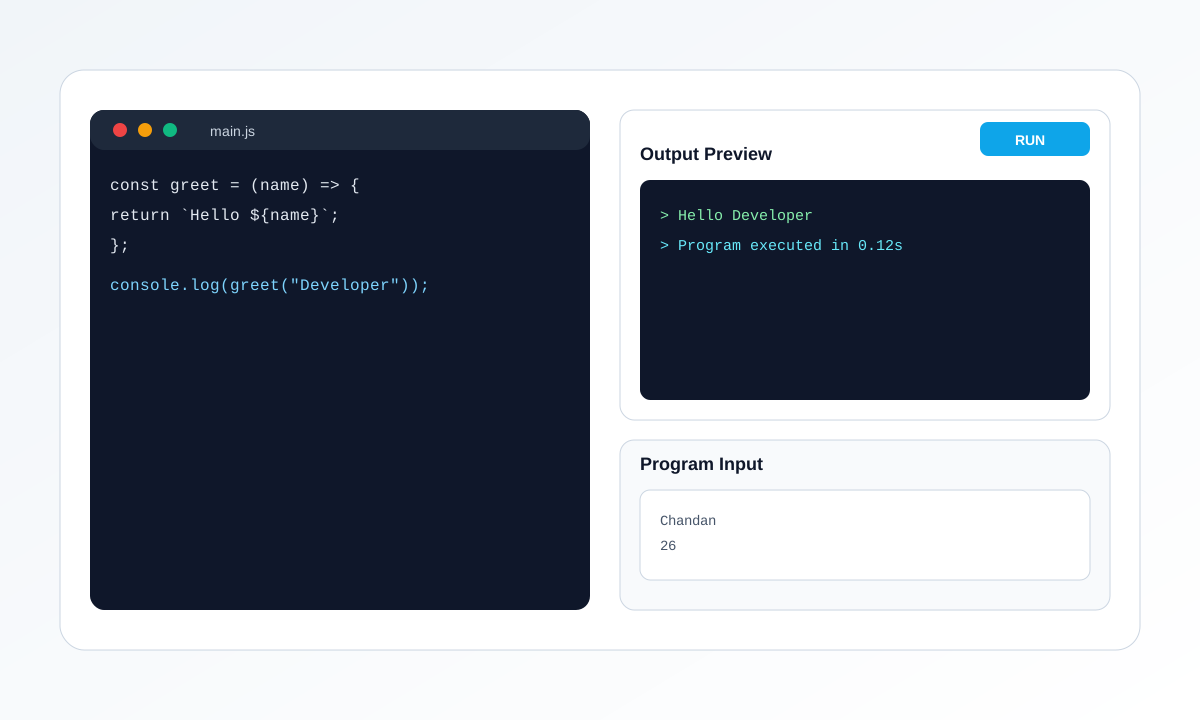
Visual Walkthrough
The left panel is your code editor, and the right panel shows output. Use tabs for files, add input lines when using prompt(), then click Run to refresh result instantly.
- Pick the correct mode: HTML or JavaScript.
- Edit code in active file tab and keep snippets focused.
- For JavaScript input, add one value per line in Program Input.
- Run and read output or error logs to debug quickly.
About This HTML Compiler
This compiler gives you a browser-based frontend workspace where index.html, styles.css, and script.js are available together. It is ideal for testing layout ideas, learning semantic markup, and validating interaction snippets quickly.
- Edit HTML, CSS, and JavaScript in one workspace
- Live preview for rapid visual feedback
- Download generated code output
- Useful for classes, tutorials, and UI experiments
How to Use
- Write page structure in index.html.
- Add design rules in styles.css.
- Attach interactions in script.js.
- Press Run to render the latest output.
Use the formatter for JSON/YAML/XML cleanup and the regex tester for parsing and validation workflows.
Starter Example: Semantic Article Card
Try this starter snippet and modify it in the compiler above.
<article class="post">
  <h2>Build Responsive Components</h2>
  <p>Practice semantic HTML with clean structure.</p>
  <a href="#">Read more</a>
</article>

<style>
.post {
  max-width: 420px;
  border: 1px solid #e2e8f0;
  border-radius: 12px;
  padding: 16px;
  font-family: system-ui, sans-serif;
}
.post a { color: #0ea5e9; text-decoration: none; }
</style>
Basic Topics with Examples
Start with foundations before moving to advanced implementation patterns.
Semantic Layout Basics
Use semantic tags to improve readability and accessibility. Search engines also understand structure better with meaningful tags.
<header><h1>Online Compiler</h1></header>
<main>
  <section>
    <h2>Welcome</h2>
    <p>Learn frontend quickly.</p>
  </section>
</main>
<footer>Copyright 2026</footer>
Key takeaway: Prefer header, main, section, article, and footer instead of generic div-only layouts.
Forms and Basic Validation
HTML form attributes provide immediate client-side checks before any backend integration.
<form>
  <label>Email</label>
  <input type="email" required placeholder="name@example.com" />
  <button type="submit">Submit</button>
</form>
Key takeaway: Use input types and required attributes to improve user experience quickly.
Responsive Grid Introduction
Build simple responsive cards using CSS Grid with auto-fit and minmax.
<div class="grid">
  <div>Card 1</div><div>Card 2</div><div>Card 3</div>
</div>
<style>
.grid {
  display: grid;
  grid-template-columns: repeat(auto-fit, minmax(160px, 1fr));
  gap: 12px;
}
.grid > div { padding: 10px; border: 1px solid #ddd; }
</style>
Key takeaway: Auto-fit grids are a fast way to support mobile, tablet, and desktop layouts.
DOM Click Interaction
Connect a button with a DOM update using minimal JavaScript.
<button id="countBtn">Clicked 0 times</button>
<script>
let count = 0;
const btn = document.getElementById('countBtn');
btn.addEventListener('click', () => {
  count += 1;
  btn.textContent = 'Clicked ' + count + ' times';
});
</script>
Key takeaway: Start with small event-driven interactions and grow complexity gradually.
Advanced Topics with Examples
Apply production-oriented patterns for performance, structure, and maintainability.
Accessible Modal Pattern
A modal should manage keyboard focus and include ARIA attributes for better accessibility.
<button id="open">Open</button>
<div id="modal" role="dialog" aria-modal="true" hidden>
  <p>Modal content</p>
  <button id="close">Close</button>
</div>
<script>
const modal = document.getElementById('modal');
open.onclick = () => modal.hidden = false;
close.onclick = () => modal.hidden = true;
</script>
Key takeaway: Advanced UI patterns should include accessibility behavior, not only visuals.
CSS Custom Properties and Theme Switch
Use CSS variables for scalable design systems and dynamic theming.
:root { --bg: #ffffff; --text: #0f172a; }
[data-theme="dark"] { --bg: #0f172a; --text: #e2e8f0; }
body { background: var(--bg); color: var(--text); }

<button onclick="document.body.dataset.theme='dark'">Dark</button>
Key takeaway: Variables reduce repetition and make large style updates safer.
Component-style Reusability
Create reusable UI blocks by templating repeated HTML and data mapping in script.
const users = ['Asha', 'Ravi', 'Nina'];
const list = users.map((u) => `<li class=\"user\">${u}</li>`).join('');
document.body.innerHTML = `<ul>${list}</ul>`;
Key takeaway: Template generation helps scale from static pages to dynamic interfaces.
Performance Basics with Lazy Assets
Improve page speed using image lazy loading and reduced script work on initial paint.
<img src="hero.jpg" alt="Hero" loading="lazy" />
<script>
window.addEventListener('load', () => {
  // defer non-critical logic here
});
</script>
Key takeaway: Good performance improves both user experience and SEO signals.
Common HTML/CSS/JS Errors and Fixes
Preview not updating
Click Run after edits and verify there are no syntax errors in script output.
Styles not applied
Check class names and selector spelling. Confirm style rules target the correct element.
Script logic failing
Use console logs and validate that queried DOM elements exist before accessing properties.
Can I run HTML, CSS, and JavaScript together?
Yes. You can edit all three files and run them in the same live preview environment.
Is this compiler free for learning web development?
Yes. This tool is free for practice, learning, and frontend experimentation.
Can I use this on mobile or tablet?
Yes. The interface is responsive and works on desktop, tablet, and mobile screens.
HTML & CSS Online Compiler - Learn Web Development
Our HTML and CSS online compiler is a web-based editor that lets you write HTML markup and CSS styling, then instantly see the rendered result in a live preview. No installation needed, no server setup required. Perfect for beginners learning HTML and CSS, developers prototyping layouts, and designers creating responsive web designs. Write your code, see it rendered immediately, and refine until it looks perfect.
Key Features
🔄 Live Preview
See your HTML and CSS rendered instantly as you type. Changes appear immediately in the preview panel without needing to refresh or compile.
📱 Responsive Design
Test your designs on different screen sizes. Preview how your layouts respond to mobile, tablet, and desktop viewports in real-time.
🎨 Full CSS Support
Write modern CSS including Flexbox, CSS Grid, animations, gradients, and all CSS3 features. Test advanced styling techniques instantly.
✏️ Clean Workspace
Distraction-free coding environment with side-by-side code and preview. Focus on learning and building without external distractions.
What Can You Build?
- Landing Pages - Create professional-looking landing pages with HTML and CSS
- Portfolio Websites - Build personal portfolio sites to showcase your work
- Form Designs - Test form layouts, styling, and validation UI
- Responsive Layouts - Learn Flexbox and CSS Grid with live preview feedback
- UI Components - Build buttons, cards, navigation bars, and other reusable components
- CSS Animations - Experiment with transitions and keyframe animations safely
Getting Started Guide
- Write HTML - Start with basic HTML markup in the editor. Create headings, paragraphs, links, buttons, and forms.
- Add CSS Styling - Use CSS to style your HTML elements. Add colors, fonts, spacing, layouts, and effects.
- Preview Live - The right panel shows your rendered webpage instantly as you type.
- Test Responsiveness - Resize the preview panel to test how your design looks on different screen sizes.
- Iterate and Refine - Change your code and watch the preview update in real-time.
- Download or Copy - Save your code to your projects or share it with others.
Perfect For
- Beginners learning HTML and CSS fundamentals
- Designers prototyping web layouts and designs
- Developers testing CSS features and techniques
- Students completing web development assignments
- Quick website mockups and prototypes
- Teaching HTML and CSS in classrooms or tutorials
Tips for Success
- Start Simple - Begin with basic HTML structure before adding complex CSS
- Use Comments - Add HTML comments to organize your code sections
- Test Syntax - Check the preview to catch HTML or CSS errors immediately
- Learn Responsiveness - Use media queries to make layouts adapt to different screen sizes
- Explore CSS Grid and Flexbox - These modern layout tools make responsive design much easier
- Save Your Work - Copy completed projects to file or use external storage